

The backyard is where the family spends its summer evenings, and the front lawn is the part the whole street sees. Between them runs a side yard: a strip of grass squeezed between the house and the fence, often with a gate halfway along and a flower bed crowding one edge. If that sounds like your property, the real question before buying a robot mower is not which model is smartest. It is whether one machine can look after both lawns, or whether the front yard stays a push mower job.
In most yards, one robot mower can handle both. Whether it works smoothly comes down to two things: whether the mower can physically drive from one lawn to the other, and how you set up zones and schedules in the app. This guide compares the two ways a split yard can be set up, shows how the Sunseeker S4 and X5 fit each one, and walks through the setup in order.
Connected Lawns vs Separate Lawns
Every front yard and backyard layout falls into one of two groups. In a connected yard, a strip of grass or a passage runs between the lawns and the mower can drive through it. In a separated yard, something the mower cannot cross sits in the way, such as a paved driveway with a curb, a set of steps, or a fence with no opening.
Whether a route counts as drivable is a physical question, not a software one. A connection drawn on the map cannot make the mower cross steps, closed gates, or other barriers it cannot climb. Before you think about zones, walk the route between your lawns and look at three things:
- The narrowest point. Side yards often pinch down beside an air conditioning unit, a downspout, or an overgrown shrub. Measure there, not at the widest spot.
- Steps and raised edges. A single step or a tall edging strip can break an otherwise easy route.
- Gates. A gate that is closed when the mower is scheduled to pass blocks the route just as surely as a wall.
Your answers decide which of the two setups below fits your yard.
Option 1: One Map With Two Zones and a Corridor
When the lawns are connected, the usual approach is a single map that holds each lawn as its own work zone, plus a corridor, sometimes called a channel, that links them. The mower mows one zone, drives through the corridor, mows the next, and finds its way back to the charging station on its own.
Two details make this work. The corridor needs to overlap each work zone, so the mower can travel between them and still get back to the dock. And the two work zones should not overlap each other too much, or the app may merge them into one zone.
Strengths
- One charging station serves the whole property.
- The mower moves between lawns without you carrying it anywhere.
- Each zone can run on its own schedule, which matters when the front and back are used differently.
Trade-offs
- The passage has to stay wide enough and clear. A bike left in the side yard can stop the mower partway.
- Time spent driving through the corridor is time not spent mowing, so a long side yard adds to each session.
- Gates on the route have to be open whenever the mower is scheduled to pass.
Option 2: Lawns the Mower Cannot Drive Between
Some front lawns are cut off completely: a driveway with a high curb, a stone staircase, or a walled courtyard. In that case the mower cannot reach the second lawn on its own, and it cannot drive back to its charging station from there either.
A mower that can store more than one map gives you a way to handle this. The S4, for example, holds up to 5 maps, so a lawn that cannot be linked by a corridor can be mapped separately. Because the mower has to be moved to and from that lawn, check the app and the user manual for how a separate area is mapped and run before you buy. If one lawn is cut off and small, that routine may be all you need. If you would have to carry the mower every few days, it is worth looking at the pinch point again.
Often the simplest fix is physical. Trimming back a shrub, moving a planter, or regrading a single step into a gentle slope within the mower's rating can turn a separated yard into a connected one, and that is usually easier to live with than moving the mower by hand.
Sunseeker S4 vs X5 for a Front and Back Yard
Both Sunseeker models are wire-free and both support multiple zones, but they suit different properties. Here is how they compare on the points that matter for a split yard, using the specs listed on each product page.
| What matters | Sunseeker S4 | Sunseeker X5 |
|---|---|---|
| Rated lawn area | Up to 0.25 acre (10,890 sq ft) | Up to 0.5 acre |
| Navigation | 3D LiDAR plus Vision AI | RTK-GNSS plus VSLAM vision |
| Zones | Up to 100 zones across 5 maps | Up to 100 zones |
| Narrow passages | Crosses passages down to 31.5 in (80 cm) | Check the passage requirements in the manual |
| Steepest slope | 42% (22°) | 60% (30°), all-wheel drive |
| Check before buying | Walls, fences, or trees around wide open lawns for the LiDAR to read; grass under 3.5 in, not Zoysia or St. Augustine | A clear view of the sky for the RTK antenna; Wi-Fi where the charging base sits |

The Sunseeker S4 is built for the yard described at the top of this guide. Its product page lists front and back lawns that connect only through narrow passages between flower beds as one of the situations its zones are meant for. Because it builds its map with LiDAR rather than satellite positioning, it keeps its bearings under tree canopy, a common spot for side yards. The one thing to check is the shape of the lawn: the product page FAQ explains that the LiDAR needs reference objects such as walls, fences, or trees around the lawn, and it sets limits on how long a single open stretch can be.

The Sunseeker X5 covers twice the rated area and handles steeper ground, which suits a half-acre property where the front lawn slopes toward the street. Its product page describes real 0.5-acre U.S. yards with slopes, trees, and front and back zones. You map it by driving it around each lawn once from your phone, then adding no-go zones and corridors; the product page puts most yards at 20 to 25 minutes. Any boundary can be walked again or edited later, so changing the corridor after a landscaping project does not mean starting over.
One Schedule for Everything vs a Schedule per Zone
Once the lawns are mapped, you choose how the mower spends its time. The simplest setup is one schedule for the whole map. It is easy to manage and fine for lawns that are used the same way and grow at the same pace.
Zone scheduling is where a split yard benefits most. On both the S4 and the X5, each zone can have its own schedule, cutting pattern, and priority. That lets you plan around how each lawn is actually used:
- The backyard can run at times when children and pets are usually inside, so the lawn is free when people want it.
- The front lawn can be timed so it always looks tidy before the weekend, when guests and neighbors are most likely to notice.
- A shaded side strip that grows more slowly can run less often, so the mower is not cutting the same short grass every day.
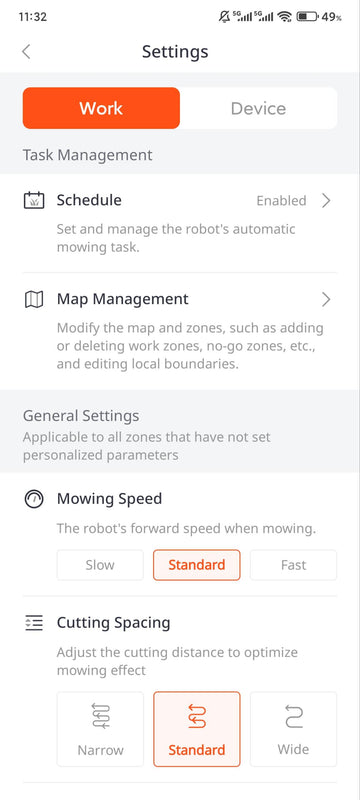
A sensible approach is to start with one schedule for the first couple of weeks, watch how each lawn responds, and then split it into zone schedules once you know which areas need more or less attention.
How to Set Up a Front Yard and Backyard, Step by Step
The exact screens differ by model, but the order below holds for a connected yard on either mower.
- Sketch the yard. Draw each lawn, the passages between them, and fixed obstacles such as flower beds, ponds, and play areas.
- Measure every passage at its narrowest point. On the S4, plan for at least 31.5 in (80 cm). On the X5, check the passage and boundary setback requirements in the manual.
- Clear the route. Trim back anything that overhangs the passage, and decide how gates will be handled at mowing time.
- Place the charging station. Choose open, level ground with clear space in front of it. For the X5, keep the base within Wi-Fi range and mount the RTK antenna where it has a clear view of the sky.
- Map each lawn as its own work zone. Map the first lawn, drive the mower to the second, and map that one. Keep the two zones from overlapping too much.
- Map the corridor. Link the zones with a corridor that overlaps both, so the mower can travel between them and return to the dock.
- Add no-go zones. Mark beds, ponds, and anything else the mower should stay out of.
- Set the schedules and watch the first run. Give each zone its days and times, then follow the mower through the passage once and confirm it gets back to its charging station.
For the full first-time setup on each model, including app pairing and mapping controls, see our Sunseeker S4 setup guide and our Sunseeker X5 setup guide.
Which Setup Fits Your Yard?
Use your walk around the property to land on an answer:
- The lawns are linked by a passage wide enough for the mower, with no steps or locked gates. Use one map with two zones and a corridor, and give each zone its own schedule.
- The lawns are linked, but a pinch point or a step gets in the way. Fix the pinch point if you can. If you cannot, treat the cut-off lawn as a separate area.
- There is no drivable route at all. Plan for a separate map and check how your model runs it before you buy.
- The total lawn is a quarter acre or less, with trees and tight side yards. The S4 is the closer fit.
- The total lawn is up to half an acre, or the front lawn slopes. The X5 is the closer fit.
Measure your side yard, then compare it with the zone and passage specs on the S4 product page and the X5 product page. Ten minutes with a tape measure now tells you whether one mower will cover the whole property.
Frequently Asked Questions
Can one robot mower mow a front yard and a backyard?
Yes, in most yards. If the mower can drive between the two lawns, you map each one as a work zone and link them with a corridor. If it cannot, a model that stores more than one map can still cover both, but you will need to move it between lawns.
How narrow can the passage between my lawns be?
It depends on the model. The Sunseeker S4 crosses passages down to 31.5 in (80 cm). For the X5, check the passage and boundary setback requirements in the manual, and always measure at the narrowest point of the route.
Can each zone have its own mowing schedule?
Yes. On both the Sunseeker S4 and X5, each zone can have its own schedule, cutting pattern, and priority. That lets the backyard and front lawn run at different times and frequencies.
Can a robot mower go through a gate?
Only when the gate is open. A connection on the map cannot make the mower cross a closed gate, steps, or other barriers. Keep the gate open during scheduled runs, or treat the lawn beyond it as a separate area.


